When I launched OTPilot a few days ago, the promise was simple: a Chrome extension that auto-fills TOTP codes on login pages — no phone, no copy-paste. It worked. But it felt like a v0.0.1.
After few packed releases, OTPilot is starting to feel like a finished product. v0.0.4 and v0.0.5 aren’t minor updates — they’re the kind of changes that turn a functional tool into something you actually enjoy using.
v0.0.4 — Multi-account and detection that doesn’t give up
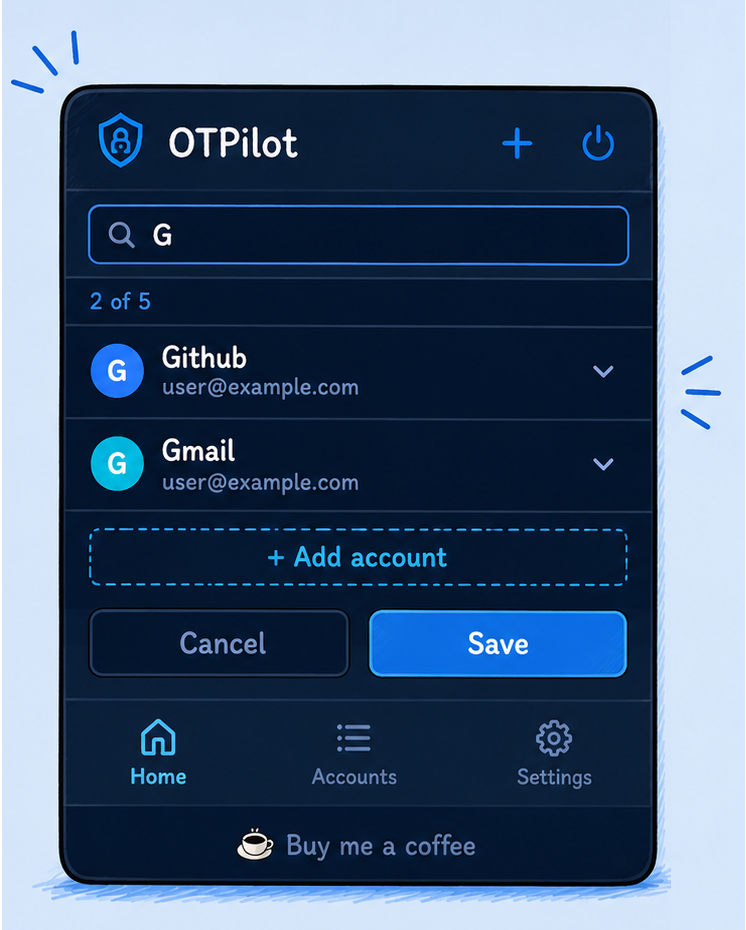
The most common complaint was simple: “I have two GitHub accounts.” Work and personal on the same domain, and OTPilot silently filled the first one it found. Not anymore.
Email per account. Each account now stores an optional email, extracted automatically when scanning the setup QR (if the URI contains something like GitHub:alice@work.com, it captures it without you typing anything). In Accounts, cards no longer say “Account 3” — they show the name and email as a real identity.
Multi-account picker for the same domain. When OTPilot detects two or more accounts for the same site, instead of guessing, it shows a floating overlay with the account list and two buttons per row: Fill (fills the code on the page) and Copy (copies it to clipboard). The email appears as subtext under each name so there’s no confusion.
More robust QR detection. This was the most technical part. Before, detection assumed the QR was always in the DOM at page load. Now:
- A MutationObserver detects QRs that appear inside dynamically injected modals (the Ko-fi case and many SPAs).
- If the initial pass with keyword filters (
qr,otp,mfa) finds nothing, it falls back and scans all visible images larger than 80px — covers cases where the QR file has a generic name. - If a freshly injected image hasn’t finished loading yet, it waits for the
loadevent before trying to scan it. - Auto-fill also triggers when an OTP field is injected into a post-load modal, not just on initial page load.
Small but important fixes. The “Save account?” overlay was disappearing when dismissed but reappearing immediately — that’s fixed. And the lock icon changed from a closed padlock to a power button, which better communicates “end session” without the ambiguity of open-padlock vs closed-padlock.
v0.0.5 — Accounts really grew up
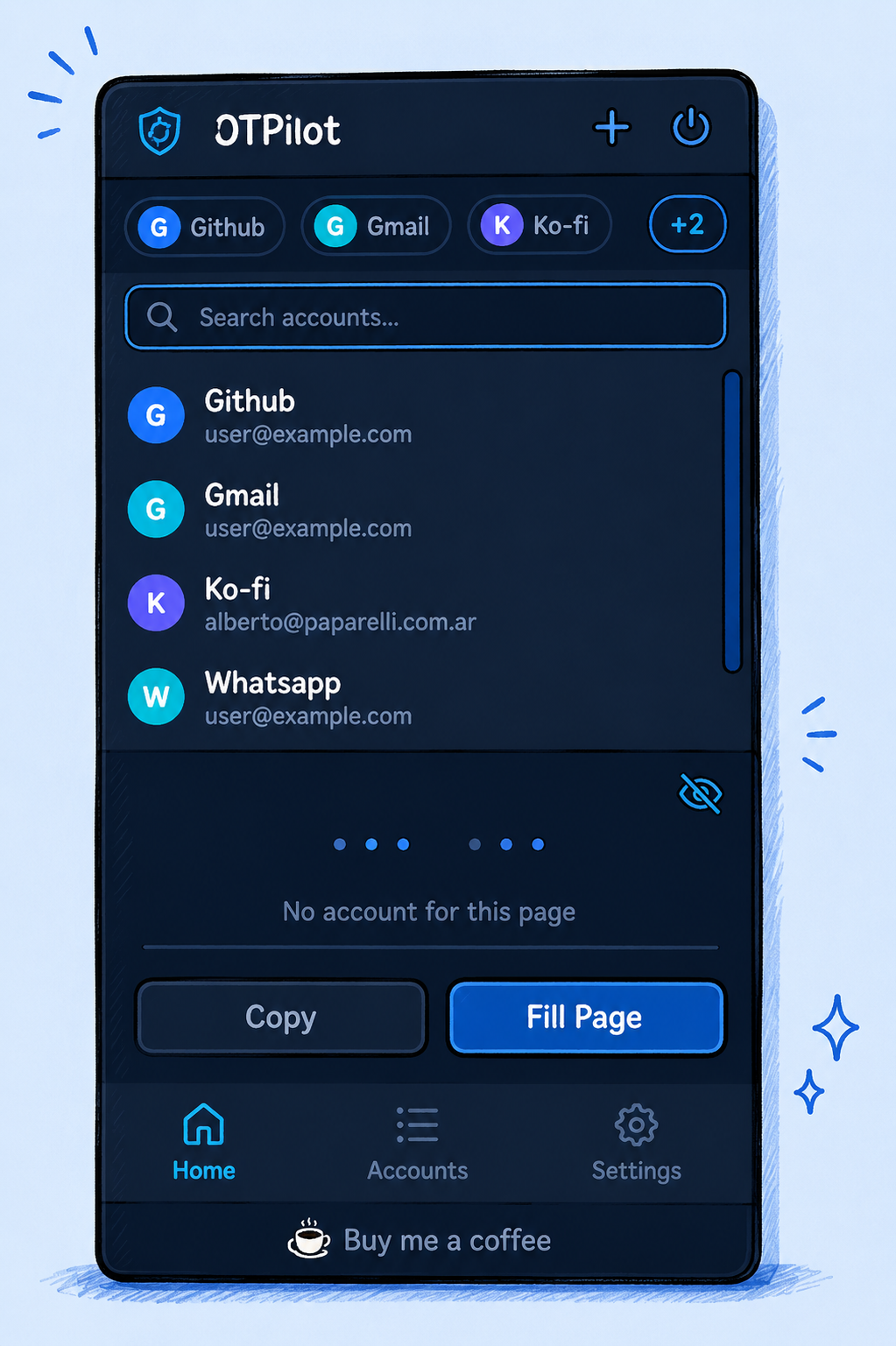
v0.0.5 is almost entirely UX, and it’s the most visually noticeable release.
Accounts redesigned. The account list went from stacked cards to a compact accordion sorted alphabetically. Each row shows the color avatar, name, and email; clicking it expands to show the full form and collapses the previously open one. At the top there’s a search bar that filters by name or email in real time, with an account counter that updates as you type. Clean, fast, scalable.
Account switcher that doesn’t break with many accounts. The previous horizontal tab bar worked fine with 3 or 4 accounts. With 8, it was a horizontal scroll nobody wanted to use. The new design shows the first three accounts as compact chips (avatar + name). If you have more, a +N button appears that opens a panel with live search. You can navigate between 20 accounts as fast as between 2.
Sticky footer. The bottom nav and the Ko-fi link are now always anchored to the bottom of the popup, with a minimum height that prevents the popup from looking too small on the home view.
Selective export. Before, exporting backed up all accounts. Now, clicking Export shows a picker with all accounts (all selected by default). You can uncheck the ones you don’t want to include before entering the encryption password.
Import with merge. When importing a backup, after decrypting you get a picker with all accounts from the file. Accounts already in your Accounts tab are shown dimmed with an “already added” badge and can’t be selected. New ones are checked by default. Only the ones you confirm get added — existing accounts are never overwritten, and nothing you already have is ever removed.
What’s next
Three things on the roadmap I’m excited about.
Firefox. The extension uses the native chrome.* API, which makes it Chrome/Chromium-only. The next step is migrating to browser.* using Mozilla’s polyfill and publishing to addons.mozilla.org. One codebase for both browsers.
Cloud sync. Right now everything lives only in chrome.storage.local. That’s fine, but if you use more than one browser or computer, it’s a problem. The idea: include (an optional) cross-device sync with E2E encryption: the backend receives a blob encrypted with your master password and never sees the raw secrets.
Code sharing. The most ambitious idea: share a TOTP code with a teammate without exposing the underlying secret. The backend generates the TOTP when the recipient requests it, and the owner can revoke access instantly. Ideal for teams with shared accounts.
It’s free on the Chrome Web Store. Source code is on GitHub if you want to audit it.